


Crafting Prompt by Harmeet
Chapter 1: Introduction
Welcome to the incredible world of AI! It's a place with endless possibilities, and we're excited to be your guide as you explore the amazing potential of ChatGPT.
You might be thinking, "Why ChatGPT? There are tons of AI tools out there!" What makes ChatGPT special is its ability to have real conversations and create text that sounds like a human wrote it. Need answers? Want insights? Help with work or a creative boost? ChatGPT can do it all!
But here's the thing: ChatGPT needs your guidance. Think of it like a powerful engine – you need to steer it in the right direction. That's where "prompting" comes in. By giving ChatGPT the right instructions, you can get amazing results.
This guide will teach you everything you need to know about prompting. We'll start with the basics and then dive into advanced techniques that will blow your mind. We'll share real-world examples and proven tips to help you get the most out of ChatGPT.
Get ready to unlock the magic of AI! This guide is your key to crafting compelling prompts, having better conversations with ChatGPT, and discovering all that it can do. And the best part? It's completely FREE!
So, what are you waiting for? Let's dive in and explore the exciting world of ChatGPT together!
Chapter 2: GUIDE Prompt Framework
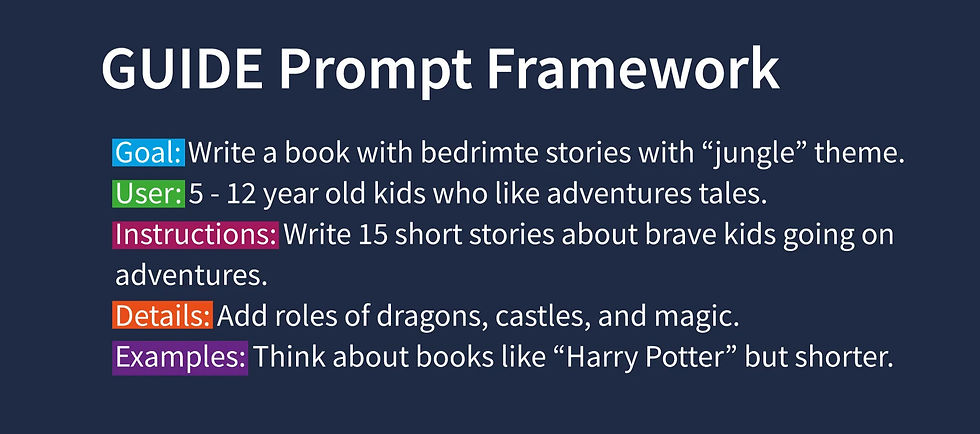
As the demand for AI-powered solutions grows, it is essential to extract high-quality responses from AI models like ChatGPT. The GUIDE prompting framework is a powerful tool to get the most from your AI, ensuring that you receive responses that meet your requirements.
The acronym GUIDE stands for:
-
G: Goal
-
U: User
-
I: Instructions
-
D: Detail
-
E: Examples
In essence, the GUIDE framework acts as a coach for ChatGPT's brain. It provides a structured approach to crafting prompts, allowing you to set a clear goal, specify the target user, give step-by-step instructions, provide details, and offer examples for context. Following this framework ensures that ChatGPT delivers top-notch answers every time.
Here are a few use cases to illustrate the GUIDE framework:
-
Use Case 1: Designing a Mobile App for Students
Goal: Create a mobile app UI to help students manage their study schedules.
User: College students aged 18-25.
Instruction: The app should have features like a calendar, reminders, note-taking, and a timer for study sessions.
Detail: The app's design should be minimalistic, with a dark mode option and customizable themes.
Example: Consider apps like "Forest" & "Scoolify" that gamify the study process to keep students engaged.
-
Use Case 2: Planning a Marketing Campaign for a New Product
Goal: Launch social media marketing campaign for a new eco-friendly water bottle.
User: Environmentally-conscious consumers aged 20-40.
Instruction: Utilize social media ads, influencer partnerships, and email marketing.
Detail: Highlight the bottle's sustainable materials and its contribution to reducing plastic waste.
Example: Refer to campaigns by brands like "Hydro Flask" or "Swell" for inspiration.
-
Use Case 3: Designing a Homework Help Mobile App for Students
Goal: Make an app to help kids with their homework.
User: Kids in 5th grade.
Instruction: The app should let kids type in questions and get answers.
Detail: Make it colorful with fun pictures.
Example: Think about games you play that teach you things.
-
Use Case 4: Creating a Fun Bedtime Storybook
Goal: Write a book with bedtime stories with a "jungle" theme.
User: Kids who like adventure tales.
Instruction: Write 5 short stories about brave kids going on adventures.
Detail: Add roles of dragons, castles, and magic.
Example: Think about books like "Harry Potter" but shorter.
This framework is versatile and can be applied to a wide range of tasks, from generating startup ideas, designing marketing and fitness plans, to crafting content such as articles, storybooks, and poems, or developing plans for apps and websites.
Remember, if you're looking for detailed responses, don't ask general questions. Instead, use the GUIDE framework to specify what you need. This approach will help you get the high-quality responses you need from ChatGPT.
Chapter 3: MIRROR Prompt Framework

In this chapter, we will explore the MIRROR framework, a unique prompt framework designed to emulate your writing style, making it easier to generate content that aligns with your personal brand and voice. If you have a particular writing style or tone that you want to capture, the MIRROR framework is a powerful tool to achieve that. It is especially useful for creating a consistent voice across multiple pieces of content.
The MIRROR framework stands for:
-
M: Medium
-
I: Intent
-
R: Reader
-
R: Replica
-
O: Outline
-
R: Reference
Here's a step-by-step guide to applying the MIRROR framework:
Medium (M)
Identify the platforms where you publish your content (e.g., Twitter, YouTube, Medium) and the formats you primarily use (e.g., long-form tweets, short tweets, videos, podcasts).
Intent (I)
Define the primary goal of your content (e.g., educate, entertain, inspire). Describe your niche in detail to specify the subjects your content covers.
Readers (R)
Identify your target audience, including their age, interests, and knowledge level. Take note of the feedback or comments you frequently receive from your audience to understand their preferences.
Replica (R)
Describe your writing style in three words. Explain how you usually start and conclude your content, providing insight into the hooks and sign-offs you employ.
Outline (O)
Detail the structure of your content (e.g., introduction, body, conclusion). Share any specific formatting preferences you have, such as the use of bullet points or headers.
References (R)
Provide 10 examples of your content for style analysis. You can upload your tweets or other content as a .doc file in a code interpreter. This step ensures that the AI understands your style, tone, and formatting preferences. Note that the content itself will not be copied, only the style and tone will be analyzed.
Let's explore a couple of examples of how you can use the MIRROR framework:
Example 1: Twitter Content Creator
-
Medium: Long-form tweets (up to 4000 characters), short-form tweets (up to 280 characters), threads (10+ linked short-form tweets)
-
Intent: Engage, inform, and spark discussions in [specific niche]
-
Readers: Twitter users interested in [your niche], ages 16 - 45
-
Replica: Writing style [e.g., witty, informative, conversational]
-
Outline: For long-form tweets, a clear beginning, middle, and end. For threads, an introduction tweet, main content tweets, and a conclusion or CTA tweet.
-
References: [Upload the .doc file with examples]
Example 2: Digital Marketing Expert
-
Medium: Short-form tweets with quick tips, long-form insights on marketing trends, threads on campaign breakdowns
-
Intent: Educate, share insights, and discuss strategies in SEO, PPC campaigns, content marketing, social media trends
-
Readers: Marketing professionals, business owners, startups, ages 22-55
-
Replica: Writing style: Professional, data-driven, actionable
-
Outline: Introduction, main content with actionable steps, conclusion with further resources
-
References: [Upload the .doc file with examples]
-
Use Cases for the MIRROR Framework:
Ghostwriting: Use the framework to emulate the style of great copywriters and deliver engaging content for your clients.
Consistent Content: Copy your own style and generate more content that maintains the same feel and vibe.
Analyze and Learn: Analyze others' content and ask ChatGPT to compare and analyze your content to learn from the best.
*Please note that while the MIRROR framework can be used with ChatGPT, you can also try it with Claude AI for even more human-like results.
It's essential to use this framework ethically. Do not use it to plagiarize or copy others' work without permission. Instead, use it to enhance your content creation, achieve consistency in your writing style, or emulate styles that resonate with your audience.
Chapter 4: Other Prompt Frameworks
The universe of AI tools is vast, and with over 6,357 tools currently on the market, the choices can be overwhelming. However, you'd be surprised to learn that a whopping 80% of these tools utilize just five core prompt structures. In this chapter, we will unpack these structures, laying bare their intricacies and best use cases, all for free!
1. RTF: Role, Task, Format
Definition:
Think of RTF as a chef's recipe, detailing who the chef is (Role), what dish they need to prepare (Task), and how it should be presented (Format).
Best for:
Role-playing, creative writing, and providing step-by-step instructions.
Example:
-
Role: Tour guide.
-
Task: Describe the Grand Canyon.
-
Format: Deliver it in a conversational paragraph aimed at tourists.
2. CTF: Context, Task, Format
Definition:
For the theatrically inclined, the CTF framework can be likened to an actor being handed a script with a scene (Context) and the expected performance (Task & Format).
Best for:
Contextual writing, descriptive tasks, and scenario simulations.
Example:
-
Context: You're in the shoes of a detective from a mystery novel.
-
Task: Chronicle the details of a crime scene.
-
Format: Craft it as a comprehensive police report.
3. TREF: Task, Requirement, Expectation, Format
Definition:
Remember those project assignments from school? That's TREF – where you're assigned a task, told what is required, what's expected, and how it should be formatted.
Best for:
Project assignments, research, and tasks with specific directives.
Use Cases:
-
Drafting a research paper.
-
Preparing a detailed presentation.
-
Designing artwork with specific elements.
4. GRADE: Goal, Request, Action, Detail, Examples
Definition:
GRADE works like a GPS, guiding you from where you are (Goal) to where you need to be (Detail) with examples illustrating the way.
Best for:
Goal delineation, action-driven tasks, and detailing processes.
Use Cases:
-
Sketching out a fitness journey and milestones.
-
Project mapping with clear steps.
-
Establishing a reading list and setting benchmarks.
5. PECRA: Purpose, Expectation, Context, Request, Action
Definition:
PECRA is your mission commander, outlining the mission's purpose, setting the bar of expectations, providing context, and then detailing the request and necessary action.
Best for:
Focused tasks, strategic planning, and briefings.
Use Cases:
-
Organizing a charity gala.
-
Proposing a new student organization.
-
Strategizing a marketing blitz.
As a hands-on exercise, incorporate these frameworks into your interactions with ChatGPT and see the difference in the AI's responses – the results will be magnified by 50 times!
Chapter 5: Advanced Prompt Frameworks

Welcome to the advanced section of our guide where we dive into the heart of the "RASCEF" prompt framework, a powerful tool that will transform the way you interact with ChatGPT.
I have harnessed the power of the "RASCEF" prompt framework and the results have been nothing short of astonishing.
But why the "RASCEF" framework?
Well, as powerful as ChatGPT is, it tends to become messy and less accurate as you throw more data at it. It's like asking a chef to make a dish without providing a specific recipe. That's where the magic of the "RASCEF" prompt framework comes in. It's essentially a recipe for ChatGPT that organizes tasks or questions to make them crystal clear and easy to understand.
Let me break it down for you:
Role (R):
This defines who the AI should pretend to be. This could range from an email marketer to a chef, or even a project manager.
Action (A):
What the AI needs to do, like drafting a project execution plan or explaining a concept.
Steps (S): T
hese are the steps or instructions that the AI should follow to complete the action, akin to a recipe.
Context (C):
This provides background information or situational context that helps the AI understand the setting. A powerful tool here is the ChatGPT Code Interpreter that lets you upload .txt files with comprehensive context and examples.
Examples (E):
These are specific instances that serve to illustrate the point. They help the AI grasp the tone and thinking/writing style.
Format (F):
How the AI should present its answer, whether in a paragraph, a list, a dialogue, or any other format.
Let's explore a couple of examples of how you can use the RASCEF framework:
Example 1:
-
Role: Digital Marketer
-
Action: Create a social media campaign plan
-
Steps: Identify the target audience, set goals, plan content, schedule posts
-
Context: New product launch (Context and examples uploaded in twitterr.txt)
-
Examples: Refer to successful past campaigns
-
Format: Detailed campaign plan
Example 2:
-
Role: Team Leader
-
Action: Plan a team building activity
-
Steps: Choose an activity, set a date and time, provide instructions
-
Context: Activity for a remote team looking to build rapport (Context and examples uploaded in teamrapport.txt)
-
Examples: Fun and engaging activities suitable for a virtual setting
-
Format: Email to the team
Example 3:
-
Role: Project Manager
-
Action: Develop a project timeline
-
Steps: Identify tasks, assign responsibilities, set deadlines
-
Context: Software development project (Context and examples uploaded in projectx.txt)
-
Examples: Refer to a previous project timeline
-
Format: Gant chart
The "RASCEF" framework has proven to be a game-changer for me.
My advice to you is to invest in learning and practicing AI prompting and automation. With a investment (GPT-4), you can unlock a world of possibilities and potentially transform your life, just as I did.
Chapter 6: Conclusion
Congratulations on completing this guide on maximizing the potential of ChatGPT through various prompt frameworks. As you've learned, effective prompting is the key to unlocking the full potential of ChatGPT and transforming your interactions into productive, engaging, and insightful conversations.
In this guide, we've covered a wide range of topics, from understanding the fundamentals of ChatGPT to exploring various prompt frameworks such as RTF, CTF, TREF, GRADE, PECRA, and the advanced "RASCEF" framework. These prompt structures can help guide the AI towards generating high-quality responses, tailored to your specific needs.
Through the examples and assignments provided in each chapter, you've seen the power of effective prompting in action, enabling you to achieve impressive results in various domains such as creative writing, goal-setting, project planning, and even automating office tasks.
As you embark on your journey with ChatGPT, don't hesitate to experiment with different prompt frameworks, customize them according to your needs, and continuously fine-tune your prompting skills. With practice, you'll become a pro at crafting effective prompts that produce the desired results, whether you're using ChatGPT for business, leisure, or personal development.
So, what are you waiting for? Start experimenting, optimizing, and harnessing the power of ChatGPT. Unlock the full potential of AI and transform your interactions and tasks into a world of endless possibilities. The future is here, and it's time to embrace it with open arms. Happy prompting!